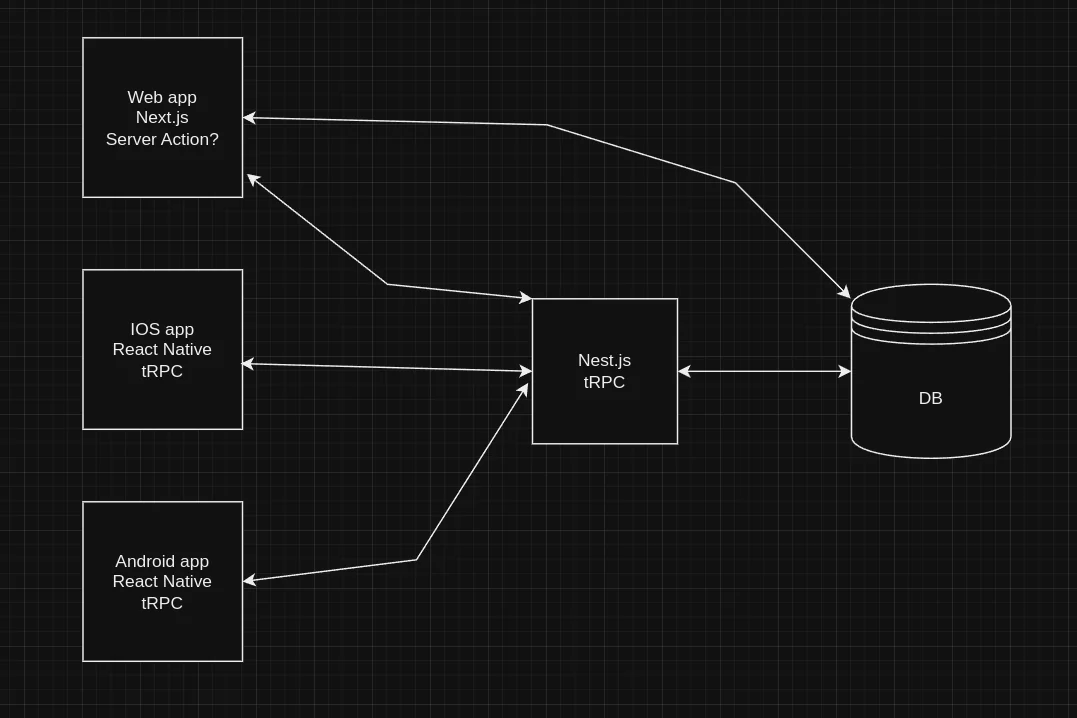
Next.js server actions were introduced as a way to run server-side code directly from a form or a component, without writing a separate API route. On the surface, that sounds like a major simplification. And in the right situation, it is.
But Next.js server actions are not a replacement for everything. Use them in the wrong place and you end up with code that is harder to test, harder to share, and harder to reason about.
This post breaks down what Next.js server actions actually are, where they genuinely help, and where you are better off reaching for a traditional API route instead. Along the way, you will see how Plainform handles this trade-off in a real production app.
What Next.js Server Actions Are
A Next.js server action is an async function marked with the 'use server' directive. When you call it from a client component or a form, Next.js runs it on the server. The browser never sees the function body — it only sends a request and gets a response back.
The simplest version looks like this:
'use server';

import { prisma } from '@/lib/prisma/prisma';

export async function saveComment(text: string) {
  await prisma.comment.create({
    data: { text },
  });
}
You can call this from a client component the same way you would call any async function. Next.js handles the serialization and the network round-trip for you.
'use client';

import { saveComment } from '@/actions/comments';

export function CommentForm() {
  async function handleSubmit(formData: FormData) {
    const text = formData.get('text') as string;
    await saveComment(text);
  }

  return (
    <form action={handleSubmit}>
      <input name="text" />
      <button type="submit">Save</button>
    </form>
  );
}
No fetch call. No API route. No endpoint to define. The client calls the server function and Next.js wires it up. That is the pattern.
Where Next.js Server Actions Work Well
Next.js server actions shine in a specific kind of situation: simple mutations that are tightly coupled to a single UI component, where you do not need to share the logic with anything else.
Form submissions in internal dashboards
If you have an admin panel with a form that updates a record, a server action is a clean fit. The logic lives close to the form, the code is short, and there is no third party that needs to hit that endpoint.
'use server';

import { prisma } from '@/lib/prisma/prisma';
import { auth } from '@clerk/nextjs/server';

export async function updateProfile(formData: FormData) {
  const { userId } = await auth();

  if (!userId) throw new Error('Unauthorized');

  const name = formData.get('name') as string;

  await prisma.user.update({
    where: { clerkId: userId },
    data: { name },
  });
}
This is exactly the kind of mutation that Next.js server actions are designed for. It reads from the form, checks auth, and writes to the database. Nothing external needs to call it.
Progressive enhancement with forms
Next.js server actions integrate directly with the HTML action attribute. That means your form can work even without JavaScript loaded — Next.js will submit it as a standard POST and the server action will run. When JavaScript is available, it upgrades to a client-side fetch automatically.
For forms that need to work in low-connectivity environments or for basic accessibility resilience, this is a real advantage over a custom fetch call to an API route.
Revalidating cache after a mutation
Server actions have direct access to Next.js cache APIs. You can call revalidateTag or revalidatePath inside a server action immediately after a write, and the next request to that page will get fresh data.
'use server';

import { revalidateTag } from 'next/cache';
import { prisma } from '@/lib/prisma/prisma';

export async function publishPost(postId: string) {
  await prisma.post.update({
    where: { id: postId },
    data: { published: true },
  });

  revalidateTag('posts');
}
You can do this from an API route too, but the Next.js server actions version is a little more direct when the mutation and the revalidation always happen together.
Where Next.js Server Actions Fall Short
Next.js server actions are not the right tool for everything. There are a few situations where they create more problems than they solve.
When external systems need to call your endpoint
Server actions are not real API endpoints. They do not have a stable, predictable URL. Stripe webhooks, third-party integrations, mobile apps, and other services need a proper HTTP endpoint with a defined contract.
If you tried to handle Stripe webhook events with a server action, it would not work. Stripe needs a URL it can POST to with its own payload format. That is fundamentally what API routes are for.
When you need rate limiting, signature verification, or custom headers
A server action runs when your own app calls it. But API routes let you inspect the raw request — headers, body format, authorization tokens. You can verify a Stripe webhook signature because you have access to the raw body and the signature header. You can apply rate limiting based on IP address.
Here is how Plainform handles the Stripe checkout. It uses an API route, not Next.js server actions, specifically because it needs to read form data, apply rate limiting, and redirect to Stripe's hosted checkout:
export async function POST(req: NextRequest) {
  const identifier = getClientIdentifier(req);
  const rateLimitResult = rateLimiters.strict(identifier);

  if (!rateLimitResult.success) {
    return createRateLimitResponse(rateLimitResult);
  }

  const formData = await req.formData();
  const priceId = formData.get('priceId')?.toString();

  if (!priceId) {
    return NextResponse.json(
      { message: 'Invalid request. Please try again.', ok: false },
      { status: 400 }
    );
  }

  const session = await stripe.checkout.sessions.create({ /* ... */ });

  return NextResponse.redirect(session.url!, { status: 303 });
}
Rate limiting, input validation, and an HTTP redirect with a specific status code are all standard API route patterns. Next.js server actions cannot return a NextResponse.redirect or produce a raw HTTP response with precise status codes.
When the same logic is called from multiple places
If multiple components or flows need to call the same logic, you can technically import the same server action in all of them. But once the logic needs to be shared beyond your own app — with a CLI tool, a webhook, a cron job — an API route with a stable URL is cleaner and easier to reason about.
When you need predictable error handling over the wire
API routes give you explicit control over the HTTP status code and response body. You return a 400 for a bad request, a 401 for unauthorized, a 500 for a server error. Clients can inspect the status code and respond accordingly.
Next.js server actions throw errors or return values, but the error handling story is less standardized. For public-facing endpoints or anything consumed by external code, the HTTP contract of an API route is easier to work with.
How Plainform Approaches This
Plainform does not use Next.js server actions. Every mutation goes through an API route.
That is not a statement against server actions — it is a reflection of what the app needs. Plainform has Stripe checkouts that require HTTP redirects, webhooks that must verify signatures, newsletter subscriptions with rate limiting, and a comments API that is shared with a third-party library. None of those fit the server action model.
The newsletter subscription, for example, applies email-specific rate limiting, validates the input with Zod, calls the Mailchimp API, and returns a JSON response with a human-readable message:
export async function POST(req: NextRequest) {
  const identifier = getClientIdentifier(req);
  const rateLimitResult = rateLimiters.email(identifier);

  if (!rateLimitResult.success) {
    return createRateLimitResponse(rateLimitResult);
  }

  const data = await req.json();
  const validationResult = newsletterSchema.safeParse(data);

  if (!validationResult.success) {
    return NextResponse.json(
      { message: 'Invalid email address. Please enter a valid email.', ok: false },
      { status: 400 }
    );
  }

  // Call Mailchimp API...
}
A server action could call the Mailchimp API, but it could not apply per-IP rate limiting based on the request or return a typed HTTP status code that the client reads to show the right error message.
If Plainform had an internal settings form where a user updates their display name and nothing external needs to touch that endpoint, Next.js server actions would be a reasonable choice. The decision is about fit, not preference.
The Decision in Practice
Here is a simple way to think about when to reach for each tool.
Use Next.js server actions when:
- The mutation is internal to your app only
- No external service needs to call the same logic
- You want to keep code close to the component that uses it
- Progressive enhancement on forms matters to your users
Use an API route when:
- External services like Stripe or third-party integrations need to POST to your endpoint
- You need to inspect request headers, apply rate limiting, or verify signatures
- You need precise control over HTTP status codes and response shape
- The logic is shared across multiple clients or entry points
Neither is wrong. They solve different problems. Next.js server actions reduce boilerplate for simple internal mutations. API routes give you a real HTTP contract that the rest of the web can work with.
A Note on Security
One thing worth understanding about Next.js server actions is that they are still HTTP endpoints under the hood. Next.js generates a URL for each server action. That means they are potentially callable by anyone who finds the URL — not just your own components.
You should always validate auth inside a server action the same way you would in an API route:
'use server';

import { auth } from '@clerk/nextjs/server';

export async function deleteRecord(id: string) {
  const { userId } = await auth();

  if (!userId) {
    throw new Error('Unauthorized');
  }

  // proceed with deletion
}
Do not assume that a server action is protected just because it is not publicly documented. Treat it like any other server-side endpoint and check authorization explicitly.
Final Thoughts on Next.js Server Actions
Next.js server actions are a genuinely useful feature for the right use case. They reduce the ceremony around simple internal mutations and make forms feel more natural in the App Router model.
But they are not a universal replacement for API routes. When you need rate limiting, webhook signature verification, raw HTTP control, or a stable endpoint that external services can call, an API route is still the right tool.
In Plainform, every endpoint is an API route because the app's mutations have requirements — rate limiting, Stripe redirects, webhook verification — that go beyond what Next.js server actions can cleanly express. If your app has simpler internal forms without those constraints, server actions are absolutely worth reaching for.
The short version: use Next.js server actions for simple internal mutations. Use API routes for anything that needs a real HTTP contract.